
Download ScriptBuddy – Free Online Script Creator, Format‑Ready Writing Tool
Overview
ScriptBuddy is a web‑based script creation platform designed for aspiring screenwriters, playwrights, and TV writers who need a reliable, free alternative to costly desktop applications like Final Draft. The tool runs entirely inside your browser, meaning you can start drafting a screenplay, stage play, or television episode from any computer or mobile device without installing software. After a quick registration, users gain access to an intuitive step‑by‑step workflow that guides you through scene creation, character definition, dialogue entry, and script formatting.
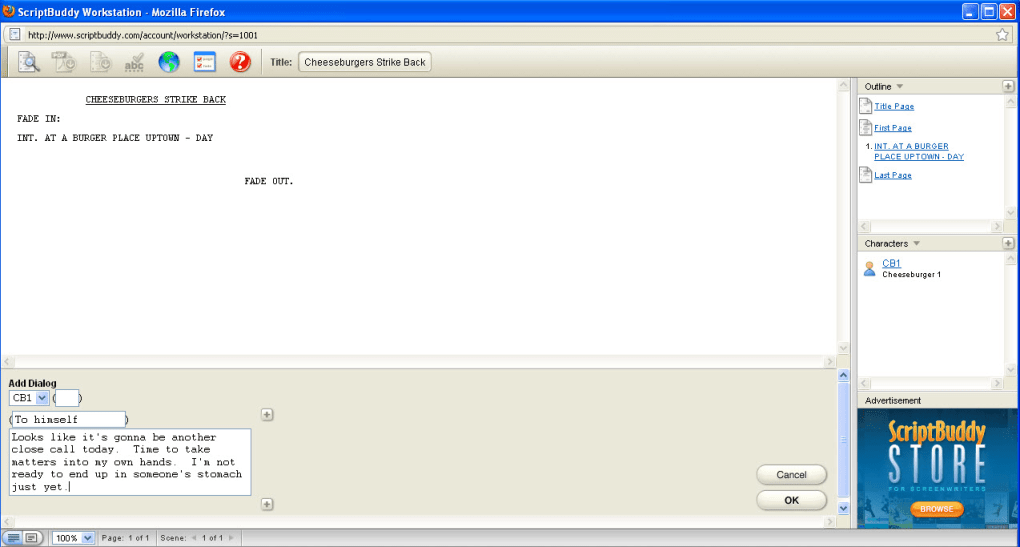
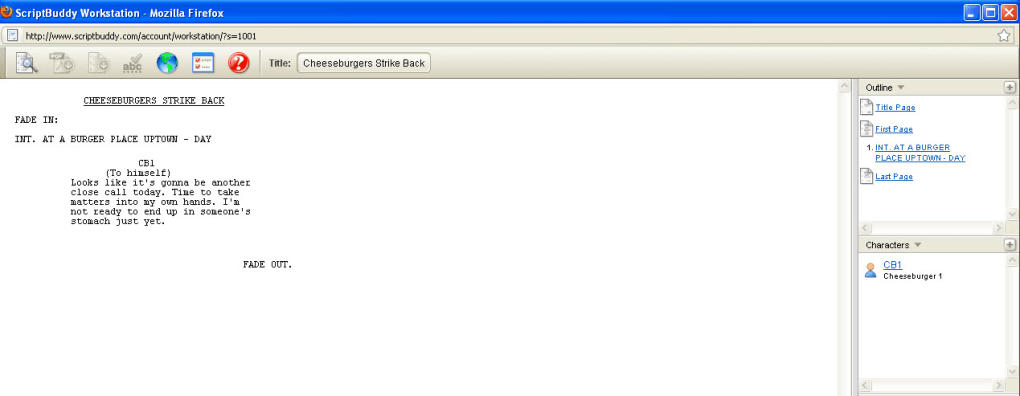
Unlike traditional word processors, ScriptBuddy automatically handles industry‑standard elements such as scene headings, character name caps, dialogue indentation, and parenthetical notes, ensuring your manuscript conforms to professional standards from the first page. The platform also stores projects in the cloud, so you can pick up where you left off on any device, making collaboration with co‑writers simple and secure. Whether you’re a student writing a class assignment, an indie filmmaker drafting a low‑budget feature, or a hobbyist experimenting with story structure, ScriptBuddy offers a straightforward, no‑cost solution that removes the barrier of expensive licensing while still delivering a polished, exportable script file.
Key Features of ScriptBuddy
ScriptBuddy packs a surprising amount of functionality for a free, browser‑based service. Its design philosophy focuses on simplicity without sacrificing the formatting rigor required by producers, agents, and competition judges. Below is a curated list of the most valuable capabilities that set ScriptBuddy apart from generic text editors and even some paid alternatives.
- Scene‑Based Workflow: Create, reorder, and delete scenes with drag‑and‑drop, while the system automatically generates proper scene headings (INT./EXT., location, time of day).
- Character Management: Define characters once, assign them to dialogue blocks, and let ScriptBuddy auto‑populate character names in caps, reducing repetitive typing.
- Automatic Formatting: Dialogue lines are indented, parentheticals are correctly placed, and action descriptions follow industry margins without manual adjustment.
- Cloud Storage & Sync: All scripts are saved to your online account, enabling seamless access from Windows, macOS, Linux, Android, or iOS browsers.
- Export Options: Download your finished script as a PDF or plain text file, ready for submission, printing, or further editing in other software.
- Collaboration Mode: Invite co‑writers via a shareable link; they can view or edit the script in real time, with version history for tracking changes.
- Template Library: Choose from pre‑made screenplay, teleplay, or stage play templates that include default formatting rules.
- Free & No Ads: The core platform remains completely free of charge and does not bombard users with advertisements.
Beyond the bullet‑pointed features, ScriptBuddy continuously rolls out minor updates that improve keyboard shortcuts, add new export formats, and tighten security on user data. The development team encourages feedback through an integrated support portal, ensuring that the platform evolves in line with the real‑world needs of writers. Because the application is web‑based, updates are applied instantly—there’s no need to download patches or reinstall software, which is a major convenience for users who value a “write‑now, worry‑later” experience.
Installation & Usage Instructions
Step‑by‑Step Setup
Getting started with ScriptBuddy is intentionally frictionless. Since the tool runs in the browser, there is no traditional installation process. Follow these simple steps to begin writing your first script:
- Open a Supported Browser: Launch the latest version of Chrome, Firefox, Edge, or Safari on any operating system (Windows, macOS, Linux, Android, iOS).
- Visit the ScriptBuddy Website: Navigate to scriptbuddy.com. The homepage features a prominent “Start Writing Free” button.
- Create an Account: Click the button and fill out a short registration form (email, password, and optional display name). A verification email is sent to confirm your address.
- Confirm Email & Log In: Click the link in the verification email, then log in with your new credentials.
- Select a Template: Upon first login, you’ll be prompted to choose a script type—Screenplay, Teleplay, or Stage Play. Each template pre‑loads industry‑standard formatting rules.
- Build Your First Scene: Use the “Add Scene” button to create a new scene. Enter the location and time of day; ScriptBuddy will automatically format the heading (e.g., “INT. COFFEE SHOP – DAY”).
- Define Characters: Navigate to the “Characters” tab, add each character’s name, brief description, and any recurring traits. Characters are saved globally for the project.
- Write Dialogue & Action: Click inside the scene block to start typing. When you type a character’s name in caps, the system switches to dialogue mode, automatically indenting and centering the text. Parenthetical notes can be added by typing inside parentheses.
- Save & Export: The platform autosaves every keystroke to the cloud. When you’re ready, click “Export” to download a PDF or .txt file.
For power users, ScriptBuddy supports keyboard shortcuts such as Ctrl+S (manual save), Ctrl+Z (undo), and Ctrl+Shift+E (export). The interface also includes a “Notes” pane where you can jot down brainstorming ideas without affecting the script’s final format. If you encounter any issues, the built‑in help center offers searchable articles and a contact form for direct support. Overall, the onboarding experience is designed to let you focus on creativity rather than configuration, making ScriptBuddy a perfect entry point for writers of all skill levels.
Compatibility and System Requirements
ScriptBuddy is a cloud‑native application, which means it is compatible with any operating system that can run a modern web browser. The platform has been tested on the following environments:
- Windows 10/11: Chrome, Edge, Firefox, and Safari (via Windows Subsystem for Linux) provide full functionality.
- macOS Monterey and later: Safari, Chrome, and Firefox deliver a seamless experience with proper rendering of PDF exports.
- Linux distributions (Ubuntu, Fedora, Debian): Any Chromium‑based or Firefox browser works without limitation.
- Android 9+ and iOS 13+: Mobile browsers support the full editor, though the drag‑and‑drop scene manager works best on tablets or larger screens.
Because all processing occurs on the server side, there are virtually no hardware constraints. A stable internet connection (minimum 1 Mbps) is required for real‑time syncing and cloud storage. The application is built with responsive design principles, automatically adjusting the layout for desktop, tablet, and smartphone viewports. For users concerned about data privacy, ScriptBuddy employs HTTPS encryption for all traffic and stores scripts in encrypted databases compliant with GDPR standards. This ensures that your creative work remains private and secure, regardless of the device you use.
In summary, whether you prefer a high‑performance workstation, a modest laptop, or a tablet on the go, ScriptBuddy adapts to your environment. The lack of platform‑specific installers eliminates the typical compatibility headaches, allowing writers to concentrate on storytelling rather than technical troubleshooting.
Pros and Cons
What ScriptBuddy Excels At
- Completely free with no hidden fees or intrusive ads.
- Automatic industry‑standard formatting eliminates manual layout work.
- Cloud‑based storage provides instant access from any device.
- Intuitive scene and character management simplifies complex scripts.
- Export options (PDF, TXT) ready for submission or printing.
Areas for Improvement
- Limited offline functionality; requires an internet connection.
- Advanced screenplay features (e.g., beat sheets, revision tracking) are not yet available.
- Collaboration lacks granular permission controls (e.g., view‑only vs. edit).
- Mobile UI, while functional, can feel cramped on small screens.
Frequently Asked Questions
Is ScriptBuddy really free, or are there hidden costs?
ScriptBuddy offers a completely free tier that includes all core writing features, cloud storage, and export options. There is no premium subscription required for the basic toolset. Future premium add‑ons may be introduced, but the free version remains fully functional for most users.
Can I export my script in a format compatible with Final Draft?
ScriptBuddy currently supports PDF and plain text (TXT) exports. While these files can be imported into Final Draft, you may need to adjust some formatting nuances manually. The platform’s plain‑text export preserves the standard screenplay layout, making the transition relatively smooth.
Is my script data safe on ScriptBuddy’s servers?
Yes. All data is transmitted over HTTPS and stored in encrypted databases. ScriptBuddy complies with GDPR and other data‑privacy regulations, ensuring that your intellectual property remains confidential.
Can I collaborate with a co‑writer in real time?
ScriptBuddy includes a collaboration mode where you can share a link to your project. Co‑writers can view or edit the script simultaneously, and changes appear instantly. However, the platform does not yet support role‑based permissions, so anyone with the link can edit the document.
Do I need to install any plugins or extensions?
No additional plugins are required. ScriptBuddy runs entirely within your browser, so you can start writing immediately after logging in. Just ensure your browser is up to date for the best performance.
Conclusion – Is ScriptBuddy Right for You?
ScriptBuddy delivers a surprisingly robust script‑writing experience without the price tag or steep learning curve associated with traditional desktop software. Its automatic formatting, cloud‑based accessibility, and straightforward scene‑building workflow make it an excellent choice for students, hobbyists, and independent creators who need a reliable tool that respects industry standards. While power users may miss advanced revision tracking or offline capabilities, the core functionality covers the majority of script‑development needs. If you’re looking for a free, secure, and instantly available solution to turn your story ideas into a properly formatted screenplay, play, or teleplay, ScriptBuddy is worth a try. Download ScriptBuddy today, start drafting your masterpiece, and see how effortless professional script formatting can be.
ScriptBuddy offers a clean, web‑based interface that handles most of the tedious formatting work for screenwriters. The cloud sync and free pricing make it an attractive option for newcomers, though the lack of offline mode and limited collaboration controls may be a drawback for larger teams.



.png)



